
FAQs
About the Games
What are the dates of the event?
The 21st edition of the Australian Masters Games will be held in Newcastle and the Central Coast, New South Wales, from 13–20 November 2027.
Where is the event?
The 21st Australian Masters Games will be held across a range of venues throughout Newcastle and the Central Coast, New South Wales.
The Games will utilise some of the region’s leading sporting facilities, along with a variety of community and specialist venues, creating a vibrant festival atmosphere across the host region. Venue information will be announced as the sports program is confirmed.
Who runs the Australian Masters Games?
The Australian Masters Games (AMG) is owned by and is a key program of the Confederation of Australian Sport’s (CAS) ‘Sport for All’ platform. The 2027 AMG is proudly supported by the City of Newcastle, the Central Coast Council and is managed by UniSport Australia Limited (UniSport) under the direction of CAS.
When will the sports and venues be announced?
You can view confirmed sports and their venues by visiting the sport-specific pages here.
How old do you have to be to compete in a Masters Games?
AMG defer to the National Sporting Organisations in regard to sport specific age requirements, including minimum age and age as at date.
Check the minimum age for your sport here.
Where there aren’t Sport specific Masters Rules the default minimum age for the event is 30 years of age as at 31 December 2027. For some sports (e.g. swimming and figure skating) the minimum age will be lower.
There is no maximum age limit.
Do I have to qualify to compete in the Australian Masters Games?
The Australian Masters Games is a mass participation event, open to anyone who meets the age requirements of their sport of choice. It does not impose qualifying standards and welcomes participants from all over the world. The only criteria to compete in the Australian Masters Games is you must meet the age criteria for your sport.
In some sports, participants will either be required to be a member of their state association or will need a temporary membership to compete. Information relating to this is contained within the respective sport pages.
What is your stance regarding minors (under 18s) at our event?
The Australian Masters Games is predominantly an ‘Over 30’s aged sporting and social event, with some early retirement sports permitting over 18s. AMG management has recently been asked about Under 18 aged supporters and officials at the 21AMG. We will release information closer to the start of the Newcastle/Central Coast games about the attendance of under 18s.
When and where will the entertainment be?
At the Australian Masters Games, the fun doesn’t stop when the competition ends! We have a packed entertainment schedule featuring live music, social events and special celebrations. You can find details about entertainment at the Games here.
Where can I buy Australian Masters Games apparel and merchandise?
Official Australian Masters Games merchandise will be available for the 2027 Games, giving participants and supporters the opportunity to celebrate their involvement in this landmark 40th anniversary event.
Details on the official merchandise range, purchasing options and collection or delivery arrangements will be announced closer to the Games.
Stay tuned for updates as we work with our partners to develop a range of commemorative and event apparel for the 2027 Australian Masters Games.
Sport
How do I find more information about my sport?
Information on the sports featured at the 2027 Australian Masters Games will be announced in the coming months.
Once released, each sport page will include key details such as competition dates, venues, age categories, divisions, entry requirements and contact information.
To celebrate the 40th anniversary of the Australian Masters Games, we are aiming to deliver a sporting program featuring more than 40 sports across Newcastle and the Central Coast. Subscribe to our newsletter and follow our social channels to stay up to date with the latest sport announcements.
Do I have to be a registered member of a sporting club to participate in the Australian Masters Games?
No, in most instances.
Some select sports may require you to become a member of the national, state, and/or affiliated body or purchase an event membership for insurance purposes. Please see your chosen sport page for further details.
How many sports and participants will be involved at the Australian Masters Games?
We are aiming to offer 40+ sports, you can see which sports are confirmed here. Around 7,500 competing/non-competing participants are anticipated to be involved in the Games.
Am I covered for personal accident/injury during the event?
Personal accident/injury insurance coverage is the responsibility of each individual competitor. We strongly encourage each participant to investigate their own requirements and needs to ensure they have adequate cover in place should an accident or injury occur during the Games.
Some sports may offer optional personal insurance through their registration process.
When will fixtures/draws for my sport be announced?
Fixtures and draws for most sports will be published around one month prior to the start of the event (October 2027).
Some draft schedules have been released. Be sure to check back on your sport page to see if these have been updated.
When will sports and venues be announced?
Sport venues can be found on the individual sport pages.
You can view the venues for the Marquee Events and Social Events here.
Where can I access results past Australian Masters Games?
Results from past Games can be accessed on the individual sport pages.
How can I find a team to play in?
You can use the Bulletin Board to find a team that is looking for members, or make your own post.
Get in contact by emailing the details provided by the person making the post. Be sure to check back regularly as there are always new posts being made!
Games Entry Fees
How much does it cost to enter?
Entry fees for the 2027 Australian Masters Games will be announced closer to the opening of registrations.
In addition to the Games entry fee, individual sports may also have a sport-specific fee. Details on all fees and charges will be published once the sports program and registration information are confirmed.
What is the difference between the Games Entry Fee and the Sport Entry Fee, and where does this money go?
The Games Entry Fee is the same for all participants and is set by the Australian Masters Games organising committee. This Games Entry Fee is directed towards the operational costs of staging the event, to ensure a well conducted event for all competitors. This includes the overall Games costs such as special events program, medals, ceremonies, and centralised services such as accreditation, staffing, first aid, etc.
The Sports Entry Fee is paid by all participants in addition to the Games Entry Fee and differs by sport and/or event. This fee is set by the sport organiser, and goes towards the costs of conducting the individual sport competition, including venue hire, equipment and timing costs, etc.
What’s the difference between a Full Access Competitor & 3-Day Access Competitor Registration Fee?
Full Access Competitor Registration Fee gives the competitor full access to all the sports on the program. The fee also grants the competitor access to the Opening & Closing Ceremonies along with the Mid-week Party.
3-Day Access Competitor Registration Fee gives the competitor limited access to the sports program in that they can only select 1 sport from the list of sports where competition runs for 3 days or less. This fee also grants the competitor access to only 2 of the special events throughout the week.
If you’re looking to compete in 2 or more sports, then you will need to select the Full Access Fee when prompted during the registration process.
What is included in my entry fee?
All the details of the inclusions for your entry can be found here.
Registration
What is the MyMasters Games Portal?
The MyMasters Games Portal is your go-to location to:
- Check your registration
- Update your details
- Register for new events
- View invoices
- View previous games registrations
- Change your password
If you’re a Team Manager, you can check who has registered for your team using the MyMasters Games Portal.
How do I register as a Competitor?
What is the difference between a Supporter and a Non-Playing Official?
A Non-Playing Official is anyone involved in a role that directly assists competitor participation, and includes team manager/s, coach/s, trainer/s, mechanic/s etc.
A Supporter applies to anyone not participating in sport events, but who would like to participate in the Games social program and attend the exclusive Games ceremonies and events.
Why can't I register for a specific age group?
If you can’t register for a certain age group within your chosen sport as a Competitor, it may be because your date of birth does not fall within the selected age bracket. Age is determined as of 31 December 2027.
If you’re registering as a Non-Playing Official (Team Manager), you’ll be able to create a team for any age bracket. However, you cannot compete in that team.
Do I need to setup a PayPal account to pay and confirm my registration?
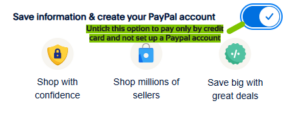
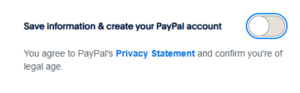
No, you don’t have to set up a PayPal account to finalise your registration. You can choose to log in to an existing account, or you can fill out your payment details manually.
If you want to pay manually, proceed to the PayPal gateway and fill out your payment details. Under the Postcode box, untick the option “Save information & create your PayPal account”. When this is unticked, the option will turn grey and you can proceed with paying manually.
I didn’t receive a confirmation email, what do I do now?
Your registration isn’t finalised until payment is processed. If your payment has successfully processed, a confirmation message in the browser you made the payment on. You should also receive a confirmation email in your inbox (be sure to check your junk or spam folder).
If you haven’t received your confirmation email within 24 hours of completing your payment, it is possible that you have not entered your email address. This is common, but easily fixed. Please send an email to amg.rego@unisport.com.au or call us on 02 6103 7080 with your name, account no. (if you have it), your address, and your correct email address and the team will update your details and re-send your confirmation email.
When and where can I collect my Accreditation?
Following the successful introduction of digital accreditation at the 2025 Australian Masters Games, all registered participants are expected to receive a digital accreditation pass for the 2027 Games.
Further information on how digital accreditation will work, including access instructions, key dates and support options, will be provided closer to the event.
Participants requiring assistance will be able to access support through the Australian Masters Games team and designated Games information locations during the event.
How do I check or make updates to my registration?
You can check your registration details by logging in to the MyMasters Games Portal after your registration has been completed.
How do I register for additional sports or events?
You can register for additional sports/events through the MyMasters Games Portal.
Once you have logged in to the MyMasters Games Portal:
- Click on “Register for Events”
- Keep clicking the “Next” button until you reach the sports selection screen.
- Choose your additional sports/events and follow the prompts through the payment screen
- Complete your payment.
Please note that you will be taken through the screens from your previous selected sports. You don’t need to do anything except click the “Next” button until you reach your newly selected sport or the payment screen.
Can I get a refund on my registration if I can't attend?
Participants can request a refund for the following instances only:
- Personal injury
- Event cancellation
- Illness
- Family caring responsibilities arising from the injury to, illness of, or passing of an immediate family member that results in an individual no longer being able to attend desired AMG activities.
All requests for refunds will be considered at the discretion of the Organiser and is also subject to conditions. To view the entire refund policy and how lodge a request, please click on the links below.
All refund requests are now closed. If you believe you have an extenuating circumstance, please email amg.admin@unisport.com.au with full details of request or supporting documents (eg: medical certificate)
Any request will be assessed on a case-by-case basis and will require consultation with the sports convenor.
Click Here to view the full refund policy
Click Here for Transfer Request Form
Team Managers
How do I register a team?
A Team Manager will need to register a team through the Registration Portal before Competitors can register into the team.
Team Managers can register as a Non-Playing Official or as Competitors. You can find a step-by-step guide on how to register a team here.
How do I register as a Team Manager who won’t be playing?
You can register as a Non-Competing Team Manager. When completing your registration, select the “Non-Playing Official” participation category on the Registration Type page on the registration portal. Once this has been selected, choose your sport/s, create your team, add yourself and position to the team, then complete your registration.
How can I check who on my team has registered?
If you are registered as a Team Manger, you can use the MyMasters Games Portal to check who has registered on your team.
Once you have logged in to the MyMasters Portal:
- Click on the “My Teams” tab
- “View team” for which team you want to view
- You can now view the team members who have registered. You also have the option of sending an email to your teammates by clicking the checkbox next to their names and then selecting “Email Team Members”
- Click on the “Back to my Teams” icon to return to your list of teams.
How do I set up additional teams?
If you’re registered as a Team Manager and want to set up additional Teams in the same or a different event, you can do this on the MyMasters Games Portal.
Once you have logged in to the MyMasters Games Portal:
- Click on “Register for Events”
- Keep clicking the “Next” button until you reach the sports selection screen.
- Choose your additional sports/events and follow the prompts to “Create a new team” when indicated in your selected sport.
- Please note that you will be taken through the screens from your previous selected sports. If you want to add additional teams in your previous selected sport, once you reach your sport, you can select “Create a new team” or “edit” against the team that has already been setup.
- Complete the team setup or edit, and follow the rest of the prompts until you reach the payment screen.
- Complete your payment for any new teams.
Travel & Accommodation
Where should I stay?
Accommodation information for the 2027 Australian Masters Games will be announced closer to the event.
With Newcastle and the Central Coast offering a wide range of accommodation options, participants and supporters will have access to hotels, apartments, holiday parks, short-term rentals and other accommodation providers throughout the region.
Information on accommodation partners, booking opportunities and visitor information will be released in the lead up to the Games.
What weather can I expect?
Newcastle and the Central Coast enjoy a temperate coastal climate, making November an ideal time to visit and compete.
Participants can generally expect warm, pleasant days and mild evenings, with average daytime temperatures typically ranging between 16°C and 25°C. The region’s coastal location provides comfortable conditions for both sport and sightseeing.
As the Games draw closer, participants are encouraged to check local forecasts and pack for a range of conditions, particularly if travelling between coastal and inland venues.
I’m an international participant, how and which visa do I apply for?
Conditions surrounding the participation of international competitors can be viewed here. Additional requirements also apply for anyone who currently resides in South Asia. Please contact the Registration Team at amg.admin@unisport.com.au
There are many visa options available. As an athlete or visitor to the Games, you are able to apply for a tourist visa. However, this will all depend on your true reason for visiting Australia.
Volunteer
How do I become an Australian Masters Games volunteer?
You can apply to volunteer here, and find more details about roles that are available.
What positions are available to volunteer?
There are numerous positions available to volunteer at the event. See the positions available here.
How can I volunteer at a sport only?
Sport specific volunteers are being recruited by the sports. Please see the contact person on the specific sports page to submit your interest or you can email your details to the AMG Team at amg.admin@unisport.com.au
Couldn’t find an answer to your question? Get in touch with us at amg.admin@unisport.com.au
Principal Partners



Major Partners

Games Partners

Stay up to date
Receive all the latest Australian Masters Games news delivered direct to your inbox.
